Use your iPhone for file storage
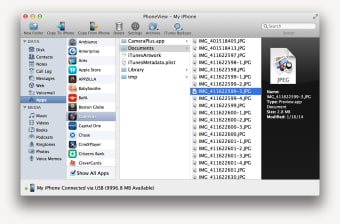
PhoneView (formerly known as iPhoneDrive) allows you to turn your iPhone into a storage and syncing device. It's the perfect desktop companion for iPhone and iPod Touch owners that want to get the most out of their mobile device.
Top Recommended Alternative

It doesn't stop at storage and syncing data however. PhoneView can be used to access and backup iTunes, voice memos, voicemail, photos, notes, SMS/MMS, contacts and call history data. You can transfer data from your Mac to your iPhone in the form of text, Word or PDF files into iPhone notes. The drag and drop interface makes it easy and fast to transfer files both ways.
The interface and ease of use of PhoneView is superb. However, many users have reported problems of it not working either when their iPhone firmware has been updated or with 3G iPhones. Subsequent updates have solved these problems however. In addition, there are problems with iOS 4. For example, Notes add/edit/delete, Call Log delete, Message delete and Camera Roll delete are not available for iOS 4 devices.
Overall, PhoneView is a handy and efficient iPhone management application that will help you get more out of your iPhone.
Changes
Adds the ability to view the contents of all third-party apps. Adds an archive management window including the ability to delete, rename and merge archives. Adds support for displaying Camera Roll thumbnails from an iOS 4.2 device. Reintroduces the ability to delete Camera Roll items for all iOS versions. (Available in Mac OS X 10.6 only.) Photos mode will now display RAW formatted photos imported using Apple's iPad Camera Connection Kit. FaceTime calls and SMS messages originating from email addresses will now be associated with Address Book contacts. Fixes an issue with displaying certain non-Latin characters in SMS messages. Other fixes and enhancements.